Choosing the right video switcher with streaming encoder can simplify a live production by combining camera switching, stream output, and—in some models—recording in one device.
This roundup compares 10 options across HDMI and SDI connectivity, 4K support, encoding formats, portability, and production features so you can match the hardware to your workflow and budget.
Best 10 Video Switcher with Streaming Encoder Picks for 2026
Best All-Around Pick
Neolive R5 4K Streaming Switcher

- Four HDMI inputs with 4K60 support on two inputs
- Dual RTMP streaming, NDI, SRT, and USB capture
- PTZ control, audio mixing, graphics, and recording
Best For: Multi-camera livestreams and hybrid production workflows
Best for Professional Hybrid Production

- Four HDMI and four SDI inputs in one switcher
- Records eight ISO feeds plus the program output
- XLR audio and triple RTMP streaming support
Best For: Hybrid HDMI/SDI events requiring ISO recording
Best Portable Option

- Compact standalone switcher, encoder, recorder, and streamer
- 5.44-inch AMOLED touchscreen with HDMI, USB, and IP sources
- Dual NP-F battery slots for mobile production
Best For: Portable livestreaming and compact field productions
Best Value Hybrid Switcher

- Four HDMI and four SDI inputs plus network and playback sources
- Streams to up to three platforms simultaneously
- Portrait support, keying, PIP, and software control
Best For: Flexible HDMI/SDI livestreaming on a practical budget
Compact NDI Encoder

- 4K HDMI pass-through with HDMI-to-NDI conversion
- Supports SRT, RTMP(S), and RTSP streaming
- Compact design with PoE, web control, and tripod mount
Best For: Portable single-source streaming and NDI conversion
Multi-Camera Production Switcher

- Four HDMI inputs and two HDMI outputs
- Streams to up to three platforms simultaneously
- Includes T-bar control, recording, overlays, and audio tools
Best For: Live events and multi-camera productions
All-in-One Production Switcher

- Combines HDMI switching, encoding, recording, and streaming
- 7-inch AMOLED touchscreen for scene control and monitoring
- Supports IP sources, Wi-Fi, Ethernet, 4G, and hot-swappable batteries
Best For: Mobile and integrated live production workflows
Best Customizable Compact Switcher
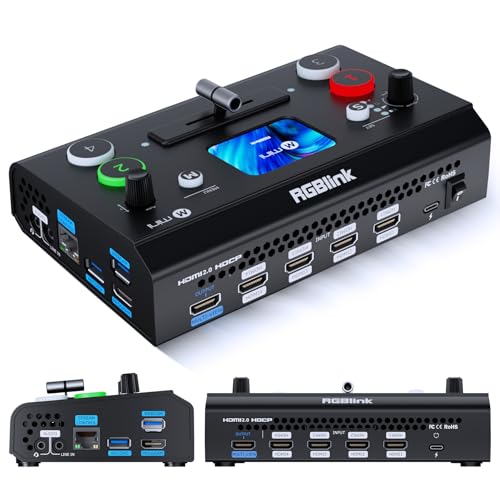
- Four HDMI inputs with dual 1080p outputs
- UVC webcam mode for computer streaming
- Optional TAO Cloud features and licensing
Best For: Entry-level multi-camera streaming and portable productions
Best Dedicated Network Encoder
1080P60 HDMI Streaming Encoder

- H.264/H.265 encoding at 1080p60
- Supports RTMP, SRT, RTSP, HLS, and WebRTC
- Browser setup without PC software
Best For: Single-source IP streaming and IPTV deployments
Best Simple Pick

- 4K inputs with HDMI, USB, webcam, and SD recording
- Integrated audio mixing, effects, PTZ, and remote control
- Supports simultaneous IP streaming to two platforms
Best For: Multi-camera events and full production workflows
Best All-Around Pick – Neolive R5 4K Streaming Switcher
If you need a video switcher with streaming encoder for multi-camera events, the Neolive R5 combines four HDMI inputs, direct RTMP streaming, NDI and SRT support, and USB capture in one unit. It is designed for creators and production teams that want hardware-based streaming without depending entirely on a computer.
Best For: Multi-camera livestreams, podcasts, worship services, conferences, sports coverage, and creators who need landscape or portrait output.
Pros:
- Four HDMI inputs, including two supporting 4K60 and two supporting 1080p60.
- Built-in encoder supports direct dual-platform RTMP streaming without a PC.
- Includes NDI, SRT, PTZ control, chroma key, graphics, recording, and USB 3.0 UVC output.
- Integrated audio mixer offers microphone inputs, monitoring, AFV/MIX modes, and audio delay.
Cons:
- Its extensive broadcast features may be more than a simple single-camera setup requires.
- Only four physical HDMI inputs are provided, so larger camera systems may need additional sources or networking.
The Neolive R5 is a flexible choice when you want switching, encoding, recording, audio mixing, and PTZ control in one workflow. Its combination of direct streaming and computer-based USB output makes it adaptable for both standalone and OBS-style productions.
Best for Professional Hybrid Production – Osee GoStream Duet 8 ISO
The Osee GoStream Duet 8 ISO is a video switcher with streaming encoder built for productions that mix HDMI and SDI cameras. It adds eight-channel ISO recording, professional XLR audio, network video inputs, and direct streaming to as many as three RTMP destinations.
Best For: Churches, event crews, studios, podcasts, and productions using both consumer HDMI cameras and professional SDI equipment.
Pros:
- Combines four HDMI 2.0 inputs and four 3G-SDI inputs without requiring separate converters.
- Records eight individual ISO feeds plus the program output for editing or recovery.
- Provides XLR and 3.5mm audio connections with phantom power, gain, EQ, compression, and delay.
- Supports NDI|HX, SRT, RTMP, UVC webcams, media playback, and triple RTMP streaming.
Cons:
- It outputs at up to 1080p even though HDMI inputs can accept 4K60.
- The professional feature set may involve a steeper learning curve than a basic switcher.
For productions where source preservation and connection flexibility matter, the Duet 8 ISO stands out. Its ISO recording and integrated audio tools are particularly useful when a live program may need post-production edits or backup angles.
Best Portable Option – Magewell Director Mini
The Magewell Director Mini is a compact video switcher with streaming encoder for creators who need switching, recording, monitoring, and streaming in a portable device. Its 5.44-inch AMOLED touchscreen, battery support, Wi-Fi, and IP-source compatibility make it suitable for field production as well as fixed setups.
Best For: Mobile creators, field producers, compact studios, and presentations that use HDMI, USB, network, or media sources.
Pros:
- Combines switching, H.264/H.265 encoding, recording, monitoring, and streaming without an external PC.
- Accepts two HDMI inputs, two USB-A sources, up to three simultaneous IP sources, and media files.
- Built-in touchscreen supports scene control, previewing, and monitoring.
- Dual hot-swappable NP-F battery slots support mobile operation.
Cons:
- It has only two HDMI ports, making it less suited to larger wired multi-camera systems.
- Hardware encoding and streaming are limited to 1080p60 rather than 4K output.
- USB cellular modems are supported but not included.
The Director Mini prioritizes portability and simplicity without abandoning advanced scene tools such as graphics, webpages, chroma key, timers, and scoreboards. It is a strong fit when a lightweight standalone system matters more than a high input count.
Best Value Hybrid Switcher – Osee GoStream Duet
Osee GoStream Duet Multiple Camera SDI and HDMI Live Stream Video Mixer Switcher
Check Price On AmazonThe Osee GoStream Duet is a practical video switcher with streaming encoder for productions that need HDMI and SDI connectivity without assembling a separate converter-based system. It supports direct streaming, computer software control, NDI HX sources, media playback, and both landscape and portrait formats.
Best For: Budget-conscious event producers, multi-camera livestreamers, churches, and users who need flexible HDMI/SDI input selection.
Pros:
- Supports four SDI inputs, four HDMI inputs, USB-C, NDI HX, and SD/SSD playback.
- Can stream to up to three platforms through Ethernet or a smartphone hotspot connected by USB.
- Offers multisource layouts, chroma key, pattern key, PIP, DSK, and multiple transitions.
- Can be controlled through its built-in GUI, Mac/Windows software, or Bitfocus Companion.
Cons:
- The supplied notes do not specify the maximum video resolution or recording format.
- Its broad control and effects options may take time to configure for first-time users.
- NDI HX requires the latest firmware to unlock the included license.
The GoStream Duet is appealing when you want a flexible HDMI/SDI workflow and direct multi-platform streaming at a lower system-complexity level. Its portrait support and software-control options also make it useful for modern social and event broadcasts.
Compact NDI Encoder – ZowieBox 4K Streaming Encoder
If you need a compact video switcher with streaming encoder capabilities for a single HDMI source, the Zowietek ZowieBox offers a flexible way to encode, decode, and stream video without a PC. It supports 4K HDMI pass-through, NDI workflows, and several IP streaming protocols.
Best For: Gamers, mobile broadcasters, and creators who need a small hardware encoder for HDMI, NDI, RTMP, SRT, or RTSP streaming.
Pros:
- Supports HDMI-to-NDI conversion, RTMP(S), SRT, and RTSP streaming.
- Provides up to 4K pass-through with zero-lag gameplay monitoring.
- Offers web-based control, PoE, USB-C power, and tripod mounting.
- Compact design includes an LCD screen and tally light.
Cons:
- Encoder and decoder modes cannot operate simultaneously.
- Does not support full NDI signals.
- USB capture-card functionality is not currently supported.
The ZowieBox is better suited to encoding and IP conversion than traditional multi-camera switching. Its small footprint and broad protocol support make it a practical choice when portability and network flexibility matter more than a physical production switcher.
Multi-Camera Production Switcher – Osee GoStream Deck HDMI Pro
The Osee GoStream Deck is a video switcher with streaming encoder features designed for multi-camera productions. With four HDMI inputs, hardware controls, audio processing, recording, graphics tools, and direct streaming to up to three platforms, it can serve as a standalone production hub.
Best For: Conferences, worship services, podcasts, education, weddings, and live events that need hands-on switching and integrated streaming.
Pros:
- Provides four HDMI inputs and two HDMI outputs for multi-source setups.
- Streams simultaneously to up to three platforms through Ethernet.
- Includes a physical T-bar, PVW/PGM buses, macros, and auto-switching.
- Supports recording, playback, chroma key, picture-in-picture, and overlays.
Cons:
- Its 1.1-pound, 11.81-inch-wide chassis is less portable than a compact encoder.
- Advanced production features may require time to configure.
- Some workflows may still benefit from the included PC control software or OBS/vMix.
Choose the GoStream Deck when you want physical switcher controls alongside streaming and recording. Its HDMI capacity and graphics features make it more appropriate for managed live productions than simple point-to-point encoding.
All-in-One Production Switcher – Magewell Director One
The Magewell Director One combines a video switcher with streaming encoder, recorder, monitor, and media-production tools in one standalone unit. It accepts HDMI, USB, IP, and media sources, then supports hardware encoding, recording, and multi-destination streaming without requiring an external PC.
Best For: Fixed or mobile productions that need integrated switching, graphics, recording, and wired or wireless streaming.
Pros:
- Combines switching, encoding, recording, monitoring, and streaming in one device.
- Supports two HDMI inputs, two USB-A inputs, and up to three simultaneous IP sources.
- Includes a 7-inch AMOLED touchscreen for scene control and monitoring.
- Offers Ethernet, dual-band Wi-Fi, 4G modem support, and dual hot-swappable batteries.
Cons:
- Hardware encoding and streaming are limited to up to 1080p60.
- The integrated 4G modem requires separate 4G service.
- Its feature-rich workflow may be more than needed for basic HDMI streaming.
Director One is the most complete option here for producers who want switching, graphics, recording, and delivery in a single system. Its touchscreen and battery support also make it appealing for field production, while IP inputs broaden its usefulness in hybrid workflows.
Best Customizable Compact Switcher – Mini V3 Video Switcher
The RGBlink Mini V3 is a compact video switcher with streaming encoder functionality for creators who need multi-camera HDMI switching, basic production effects, and direct USB streaming in a portable setup. Its four HDMI inputs, touch screen, dual 1080p outputs, and UVC webcam mode suit small live productions, though some advanced features require TAO Cloud activation.
Best For: Entry-level multi-camera streaming, compact productions, and creators who want HDMI switching with UVC webcam support.
Pros:
- Four HDMI inputs with dual 1080p HDMI outputs for program and preview.
- UVC webcam mode supports plug-and-play streaming to platforms such as YouTube and Facebook.
- Includes a 2.1-inch touch screen, T-bar control, PIP layouts, chroma key, and transition effects.
- Can record to USB drives up to 2TB and supports PTZ control through optional activation.
Cons:
- Recording and selected advanced functions require optional TAO Cloud licensing.
- Activation requires updated firmware, Ethernet internet access, and account binding.
- A 35W-or-higher USB-C power adapter is recommended for stable operation.
The Mini V3 is a practical choice when portability and hands-on switching matter more than built-in, fully unlocked production features. Confirm camera compatibility and account for the activation process before buying.
Best Dedicated Network Encoder – 1080P60 HDMI Streaming Encoder
The UNISHEEN BM1000 is a dedicated video switcher with streaming encoder capability for turning one HDMI source into network streams without a computer or specialized software. Hardware H.264/H.265 encoding, browser-based setup, and extensive protocol support make it better suited to direct IP distribution than multi-camera switching.
Best For: Single-source live streaming, IPTV distribution, remote monitoring, and digital-signage installations.
Pros:
- Hardware encoding supports H.264 and H.265 at up to 1080p60.
- Works with RTMP(S), RTSP, SRT, HLS, WebRTC, UDP, and other listed protocols.
- Browser-based configuration avoids dedicated setup software and drivers.
- Compact design supports low-power, long-running deployments and includes OSD overlays.
Cons:
- It has one HDMI port, so it is not a multi-camera production switcher.
- Advanced network configuration requires basic knowledge of IP addresses and streaming protocols.
- The listed configuration uses a 12V DC power input and does not include a power plug.
The BM1000 is a focused encoder rather than an all-in-one production console. Choose it when reliable protocol flexibility and computer-free network streaming are priorities, and verify that your power setup is complete.
Best Simple Pick – M1 4K HDMI Video Mixer
The M1 is an all-in-one video switcher with streaming encoder, recorder, monitor, and PTZ-control functions for more demanding live productions. It combines 4K HDMI inputs, USB and SD recording, audio mixing, effects, remote browser control, and simultaneous IP streaming in one larger production-focused system.
Best For: Weddings, concerts, music videos, and multi-camera events needing integrated audio, recording, streaming, and PTZ control.
Pros:
- Accepts 4K HDMI, 1080p HDMI, USB, webcam, and optionally upgradeable NDI HX sources.
- Supports USB and SD recording, two HDMI outputs, and UVC streaming.
- Provides independent audio controls, delay adjustment, ALC, noise reduction, and multiple inputs.
- Includes chroma key, luma key, logo insertion, PIP, DSK, up to 30 transitions, and remote browser control.
Cons:
- NDI functionality requires an upgrade rather than being immediately available.
- Its broad feature set may be more than necessary for simple single-camera streams.
- Some setup and operation details may require technical guidance despite the control-panel design.
The M1 is the strongest fit here for buyers who want a centralized event-production workflow instead of a basic HDMI switcher. Its feature depth is valuable for larger productions, but simpler streams may not justify the added complexity.
How We Picked the Best Video Switcher with Streaming Encoder
We focused on devices that combine video switching with built-in streaming or encoding rather than standalone HDMI-to-network encoders. The selection covers compact HDMI units, larger HDMI-and-SDI systems, ISO-capable switchers, and all-in-one production consoles. We compared input types, supported resolutions and frame rates, streaming protocols, recording capabilities, monitoring, audio connections, PTZ support, and control options.
Because live-production needs vary, no single model is ideal for every buyer. A portable creator may value a touchscreen and simple setup, while a studio or event team may need SDI, XLR audio, multiview monitoring, or isolated recordings.
Quick Comparison
- Best for compact all-in-one production: Look for a switcher with an integrated screen, encoder, recorder, and hardware controls.
- Best for multi-camera HDMI setups: A four-input HDMI model can suit classrooms, podcasts, houses of worship, and small events.
- Best for professional cabling: HDMI-and-SDI switchers are better suited to longer cable runs and mixed production environments.
- Best for post-production flexibility: ISO recording preserves individual camera feeds for later editing.
- Best for network-based workflows: NDI support can reduce reliance on direct physical video connections when the network is properly configured.
Key Buying Factors for a Video Switcher with Streaming Encoder
Inputs, Outputs, and Resolution
Count your cameras first, then leave room for expansion. Confirm whether inputs are HDMI, SDI, or both, and check whether each input supports the resolution and frame rate produced by your cameras. A switcher may accept 4K input but output or stream at 1080p, so read the specifications carefully.
Encoding and Platform Support
RTMP is widely used for platforms such as YouTube and Facebook, while SRT can be valuable over less reliable networks. H.264 is broadly compatible; H.265 may reduce bitrate requirements but is not supported everywhere. If you need a custom destination, verify support for RTSP, HLS, WebRTC, or NDI before buying.
Audio, Recording, and Monitoring
Check for XLR or other dedicated audio inputs if you use microphones or a mixer. Multiview output, an integrated display, and confidence monitoring make live operation easier. Recording options also matter: some models record the program feed, while ISO-capable systems can save separate camera feeds.
Control and Reliability
Physical buttons, touchscreen controls, software control, PTZ integration, and cloud management each suit different operators. Also confirm power requirements, cooling, storage media, firmware support, and whether the unit can continue switching if the network connection fails.
Who Should Buy Which Video Switcher with Streaming Encoder?
Solo creators and mobile producers should prioritize a compact unit with a built-in screen, straightforward controls, and one-cable streaming workflow. Small studios and event teams may prefer four or more HDMI inputs, strong audio connectivity, multiview, and recording. Professional venues and production crews should consider SDI, ISO recording, PTZ control, and redundant network options. Network-video users should choose an NDI-capable model or dedicated encoder after confirming that their switch, cabling, and network bandwidth can handle the traffic.