The right capture card can make the difference between a polished stream and a setup full of dropped frames, lag, or compatibility problems. This roundup compares 10 options for gaming consoles, cameras, laptops, and desktop PCs.
We included external USB models, internal PCIe hardware, camera-focused adapters, and cards with 4K passthrough so you can match your choice to your resolution, refresh-rate, and streaming needs.
Best 10 Capture Cards Picks for 2026
Camera Streaming Pick

- 1080p60 and up to 4K60 capture
- Connects cameras, camcorders, and action cams
- Low-latency PC, Mac, and iPad workflow
Best For: Creators turning a compatible camera into a streaming source
High-Refresh Gaming Pick

- 4K30 capture with 4K60 HDR pass-through
- VRR support up to 1440p120 or 1080p120
- Built-in 3.5mm audio in and out
Best For: Console streamers prioritizing smooth high-refresh pass-through
Next-Gen Console Pick

- 4K60 gameplay capture
- 1440p120 and 1080p240 pass-through
- HDR10 and 3.5mm analog audio input
Best For: Current-console streamers seeking 4K60 recording
Flexible Budget Pick

- 2K30 or 1080p60 recording
- 4K30 input and HDMI loop-out
- USB-A and USB-C connectivity
Best For: Everyday streaming setups needing broad compatibility and monitoring
Premium PCIe Powerhouse

- 4K60 HDR10 capture with 8K60 passthrough
- HDMI 2.1, VRR, and up to 1080p240 recording
- Designed for Windows PCs and dual-PC setups
Best For: High-end Windows gaming and streaming rigs
Easy USB Streaming Pick
- 1080p60 capture with 4K30 input support
- Zero-latency HDMI pass-through
- Plug-and-play Windows and Mac compatibility
Best For: Straightforward console and camera streaming
Compact Multi-Platform Option
- 4K30 input, 2K30 output, and 1080p60 support
- USB-A and USB-C connectivity
- Compatible with Windows, Mac, Linux, and select mobile devices
Best For: Portable streaming across computers, tablets, and phones
Best Portable Pick

- 1080p at 60FPS output
- USB-C and USB connectivity
- Plug-and-play, compact design
Best For: Portable streaming and recording
Best for Pass-Through Gaming

- HDMI loop-out for gameplay
- 1080p capture with 4K input support
- 3.5mm microphone input
Best For: Console streaming with commentary
Best for New Streamers
- 1080p at 60FPS capture
- Works with OBS, Streamlabs, and XSplit
- HDMI pass-through and portable design
Best For: Beginner gaming and live streaming
Camera Streaming Pick – Cam Link 4K
The Elgato Cam Link 4K is one of the most camera-focused capture cards in this roundup. It connects a DSLR, mirrorless camera, camcorder, action camera, or compatible iPhone to a computer over USB 3.0 for streaming and recording at up to 1080p60 or 4K60, depending on the camera and model configuration.
Best For: Creators who want to turn a compatible camera into a higher-quality webcam or streaming source.
Pros:
- Supports 1080p60 and up to 4K60 capture with compatible equipment.
- Works with cameras, camcorders, action cameras, and compatible iPhones.
- Ultra-low latency helps keep video and audio synchronized.
- Compatible with OBS, Zoom, Discord, PC, Mac, and iPad.
Cons:
- Requires a compatible camera and suitable computer setup for the highest resolutions.
- Its primary connection is HDMI to USB 3.0, so it is not a standalone recorder.
Choose this capture card when camera-based production is the priority. Its compact design and low-latency workflow make it a practical bridge between camera gear and streaming software.
High-Refresh Gaming Pick – Live Gamer Extreme 3
The AVerMedia Live Gamer Extreme 3 is a gaming-oriented choice among these capture cards, combining 4K30 capture with 4K60 HDR pass-through and high-refresh support. It is designed for console streaming with PS5, Nintendo Switch, and Xbox Series X/S, while also supporting OBS and other major platforms.
Best For: Gamers who want high-refresh pass-through, 4K recording, and direct headset or microphone connectivity.
Pros:
- Captures up to 4K30 while passing through 4K60 HDR.
- Supports VRR pass-through at 1440p120 or 1080p120.
- Plug-and-play operation requires no extra drivers or external power.
- Includes 3.5mm audio input and output for game chat and commentary.
Cons:
- Requires a computer with a USB 3.2 Gen 1 Type-C port and a supported operating system.
- Its capture resolution tops out at 4K30 rather than 4K60.
This is a strong fit for responsive console play because pass-through supports high refresh rates while the card records at 4K30. Its audio connections also simplify game-chat and commentary setups.
Next-Gen Console Pick – Elgato 4K S
The Elgato 4K S is a compact USB-C capture card aimed at current console setups. It captures 4K60 video and supports high-frame-rate pass-through at 1440p120 or 1080p240, with HDR10 support and an analog audio input for commentary or in-game chat.
Best For: PS5, Xbox Series X/S, and Switch 2 users who want 4K60 capture with high-frame-rate pass-through.
Pros:
- Captures gameplay at 4K60.
- Supports 1440p120 and 1080p240 pass-through.
- Includes HDR10 support with tone mapping on Windows.
- Works across Windows, macOS, and iPadOS with USB-C.
Cons:
- Requires a compatible USB 3.0 Type-C port and relatively current computer hardware.
- The listed capture resolution details emphasize 4K60 capture, while system support varies by platform.
For console creators who do not want to sacrifice smooth gameplay while recording, the 4K S offers a useful balance of 4K capture and high-refresh pass-through. Its analog input is helpful for adding voice or game-chat audio.
Flexible Budget Pick – UGREEN 2K HDMI Capture Card
The UGREEN HDMI capture card is a flexible option for everyday streaming and recording across Windows, macOS, Linux, and Android. It records up to 2K30 or 1080p60, accepts 4K30 input, and provides HDMI loop-out for real-time monitoring without making 4K capture its focus.
Best For: Streamers and casual creators who need broad device compatibility, loop-out monitoring, and USB-A or USB-C connectivity.
Pros:
- Records up to 2K30 or 1080p60.
- Accepts 4K30 input and supports 4K30 HDMI loop-out.
- Includes both USB-A and USB-C connection options.
- Plug-and-play design requires no external power or driver installation on supported systems.
Cons:
- Does not support 4K capture.
- PS4 and PS5 require HDCP to be turned off.
- It is not compatible with Fire TV Stick, and iPhones cannot be used as UVC data-acquisition devices.
This card makes sense when connectivity and compatibility matter more than 4K recording. The loop-out and dual USB interface are especially useful for mixed setups involving laptops, monitors, consoles, and tablets.
Premium PCIe Powerhouse – Elgato 4K Pro
For demanding PC creators, the Elgato 4K Pro is one of the most capable capture cards in this roundup. Its HDMI 2.1 connectivity supports 4K60 HDR10 capture, 8K60 passthrough, high-frame-rate recording up to 1080p240, and VRR passthrough for smoother gameplay.
Best For: Windows users building a high-end gaming or dual-PC streaming setup.
Pros:
- Captures 4K60 HDR10 video while supporting 8K60 passthrough.
- HDMI 2.1 enables up to 1080p240 recording and VRR passthrough.
- Works with popular streaming apps including OBS, Streamlabs, Twitch Studio, Zoom, and Teams.
Cons:
- Requires Windows 10 and an available PCIe slot.
- Internal installation is less convenient than USB capture cards.
The Elgato 4K Pro is a strong choice when image quality, refresh-rate support, and ultra-low-latency passthrough matter more than simple plug-and-play portability.
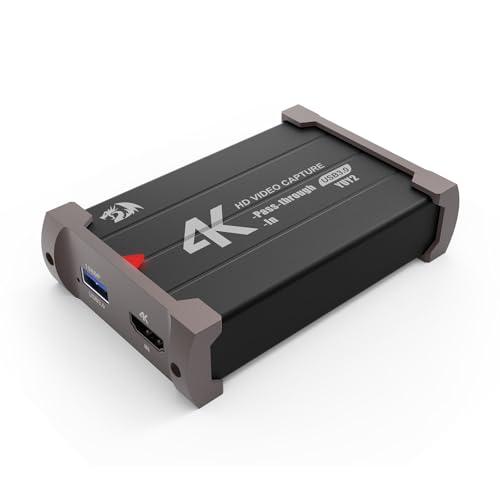
Easy USB Streaming Pick – Redragon VC321
The Redragon VC321 is a practical USB choice for gamers and creators who want straightforward capture without installing drivers. It accepts up to 4K 30fps input, captures at 1080p60, and provides zero-latency HDMI pass-through for responsive play.
Best For: Console, camera, and DSLR users seeking a simple Windows or Mac streaming setup.
Pros:
- Supports 1080p60 capture with up to 4K 30fps input.
- Zero-latency HDMI pass-through helps preserve real-time gameplay.
- Plug-and-play operation works with Windows 7 and newer and macOS 10.15 or newer.
- Captures video and audio simultaneously.
Cons:
- Capture resolution is limited to 1080p.
- Its listed dimensions are larger than those of the compact UGREEN option.
Choose the VC321 when ease of setup and broad device compatibility are priorities. It is a flexible middle-ground capture card for consoles, cameras, and everyday streaming.
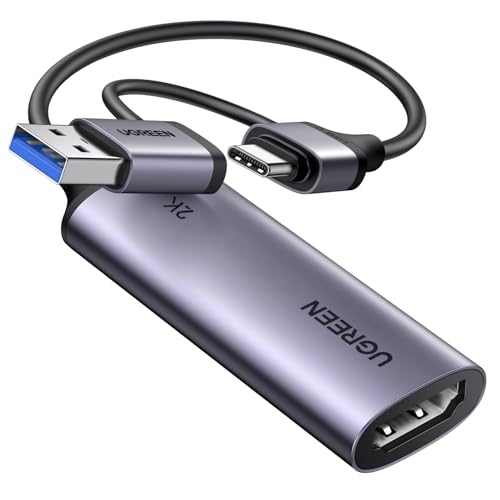
Compact Multi-Platform Option – UGREEN 2K Capture Card
The UGREEN 2K capture card is a compact HDMI-to-USB option with both USB-A and USB-C connectivity. It supports 4K30 input, 2K30 output, and 1080p60 compatibility, making it useful for streaming gameplay or camera footage to computers, tablets, and select mobile devices.
Best For: Travelers and multi-device creators who need USB-A/USB-C flexibility and broad operating-system support.
Pros:
- Supports 4K30 input, 2K30 output, and 1080p60 capture.
- Includes USB-A and USB-C interfaces for modern computers, tablets, and smartphones.
- Works with Windows, macOS, Linux, and compatible iOS or Android devices.
- Supports popular software such as OBS Studio, XSplit, PotPlayer, and QuickTime Player.
Cons:
- Accepts HDMI input only and sends a unidirectional signal to USB output.
- iPad compatibility requires iPadOS 17 or later.
- Some consoles require HDCP to be disabled.
UGREEN stands out among these capture cards for portability and connection flexibility. Its compact aluminum design and dual USB connector options make it especially convenient for mobile or mixed-device streaming.
Best Portable Pick – 4K USB-C Capture Card
This compact capture card is a practical choice for recording or streaming HDMI video through a computer. It supports up to 1080p at 60FPS output, offers USB-C and USB connectivity, and works with software such as OBS, VLC, and Zoom.
Best For: Portable streaming, online meetings, gameplay recording, and creators who need USB-C compatibility.
Pros:
- Supports 1080p at 60FPS output and input up to 4K at 30Hz.
- Plug-and-play design requires no additional drivers or external power.
- Compatible with Windows, Mac, Linux, Android, consoles, cameras, and common streaming software.
- Small aluminum-alloy design is easy to carry.
Cons:
- For capture use only; it does not directly cast to a monitor or TV.
- USB 3.0 is recommended for the best bandwidth and resolution.
- Audio setup in OBS may require restarting the software.
This is one of the more flexible capture cards for mobile setups, especially when USB-C support and broad device compatibility matter. Keep its one-way HDMI-to-USB transmission and software requirement in mind.
Best for Pass-Through Gaming – 4K HDMI Capture Card
Among these capture cards, this model stands out for gaming setups that benefit from HDMI loop-out and microphone input. It captures up to 1080p video, accepts 4K input at supported refresh rates, and connects over USB 3.0.
Best For: Console streaming with HDMI pass-through and external microphone commentary.
Pros:
- HDMI loop-out is designed for gameplay with no stated play-through delay.
- Supports 1080p capture and 4K input at 30Hz or 60Hz.
- Plug-and-play operation needs no driver or external power.
- Includes a 3.5mm microphone input for commentary.
Cons:
- Does not support 4K at 120Hz or 144Hz.
- Output supports up to 2K at 30Hz.
- The microphone input accepts only a standard 3.5mm TRS microphone headset.
This model is a useful option for streamers who want to keep playing through an HDMI loop-out while adding voice commentary. Its limitations are mainly relevant to high-refresh-rate 4K gaming.
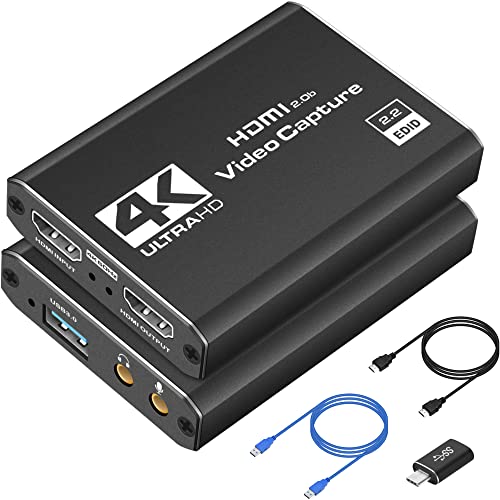
Best for New Streamers – 1080p 60FPS USB Capture Card
This USB 3.0 capture card focuses on straightforward 1080p 60FPS streaming from HDMI devices. It is designed to work with OBS Studio, Streamlabs, and XSplit, making it a convenient starting point for gaming, camera, and live-content setups.
Best For: Beginners and mobile creators streaming from PS5, Xbox, Nintendo Switch, PC, or a camera.
Pros:
- Captures smooth 1080p video at 60FPS.
- Plug-and-play setup requires no drivers.
- Compatible with Windows and Mac systems and popular streaming software.
- Supports HDMI pass-through and includes USB-C and USB extension accessories.
Cons:
- Requires a USB 3.0 port.
- 4K video is recorded or captured at 1080p 60FPS rather than 4K output.
- Compatibility is listed for Windows and Mac systems, not a wider range of operating systems.
For creators prioritizing an uncomplicated setup, this is one of the more approachable capture cards in the group. Its 1080p 60FPS focus is well suited to mainstream streaming, while pass-through helps keep gameplay practical.
How We Picked These Capture Cards
We selected these Capture Cards across several common use cases rather than focusing on one specification alone. The lineup includes compact USB devices for laptops, console-focused cards with HDMI passthrough, camera-input models, and an internal PCIe option for demanding desktop setups.
Our comparison prioritizes stated capture and passthrough resolutions, frame-rate support, connection type, plug-and-play convenience, compatibility, and whether a card is suited to gaming, live production, or camera capture. Because advertised performance can vary by software, source device, cable, and computer hardware, buyers should confirm the manufacturer’s requirements before purchase.
Quick Comparison
| Type | Best suited for | Typical advantage | Potential limitation |
|---|---|---|---|
| External USB 3.0 | Laptops, consoles, and portable setups | Simple installation and flexible placement | Uses a USB port and may depend on host-system performance |
| HDMI passthrough | Low-latency console gaming | Lets you play on a monitor while recording or streaming | Passthrough and capture resolutions may differ |
| Camera capture adapter | DSLRs, mirrorless cameras, camcorders, and action cameras | Turns a compatible HDMI camera into a webcam or stream source | Camera output, clean HDMI, and power requirements matter |
| Internal PCIe | Dedicated desktop streaming and recording | Clean cable management and high-bandwidth performance | Requires an available compatible slot and desktop installation |
Key Buying Factors for Capture Cards
Capture Resolution and Frame Rate
Check the resolution and frame rate the card can actually record or send to your computer. A model may accept a 4K signal but capture at 1080p, while another may support higher-resolution passthrough for gaming. For many streams, 1080p at 60fps is the practical target; 4K capture is more useful for high-quality recording and post-production.
Passthrough and Latency
HDMI passthrough allows the original signal to continue to a display while the computer receives a copy for streaming. If you play fast-paced games, look for zero- or low-latency passthrough and verify support for your console’s resolution and refresh rate.
Connectivity and Compatibility
USB 3.0 is common for external Capture Cards, but the computer must have an appropriate high-speed port and enough bandwidth. Also check operating-system support, required software, HDMI input type, HDCP restrictions, and whether the card works with OBS or your preferred application.
Camera Features
For camera use, confirm clean HDMI output, uninterrupted power, supported resolution, and whether the camera disables on-screen menus during output. A capture card cannot remove copy protection or correct an incompatible camera signal.
Who Should Buy Which Capture Cards?
- Console streamers: Choose a card with HDMI passthrough, 1080p60 capture, and support for your console’s output settings.
- 4K gamers and creators: Prioritize 4K input or passthrough, suitable refresh-rate support, and enough computer bandwidth for your workflow.
- Camera users: Select a camera-oriented HDMI capture card and verify clean output, power, and compatibility before buying.
- Laptop streamers: An external USB 3.0 model is usually the easiest option to install and move between systems.
- Dedicated desktop studios: An internal PCIe card can provide a tidy, high-performance setup when your motherboard and case support it.
- Budget buyers: Focus on reliable 1080p60 capture and stable USB connectivity instead of paying for 4K features you will not use.